Blackout Dates
Overview
Our Blackout Dates feature empowers users to take control of their reservations, ensuring seamless management of campsites, lodging, and time slot/rental availability. It provides a robust solution to block off specific units, multiple units, or entire facilities, preventing customers from making reservations during those periods. Whether it's due to maintenance, seasonal closures, special events, or any other reason, Blackout Dates simplifies the process and enhances operational efficiency.
Key Features:
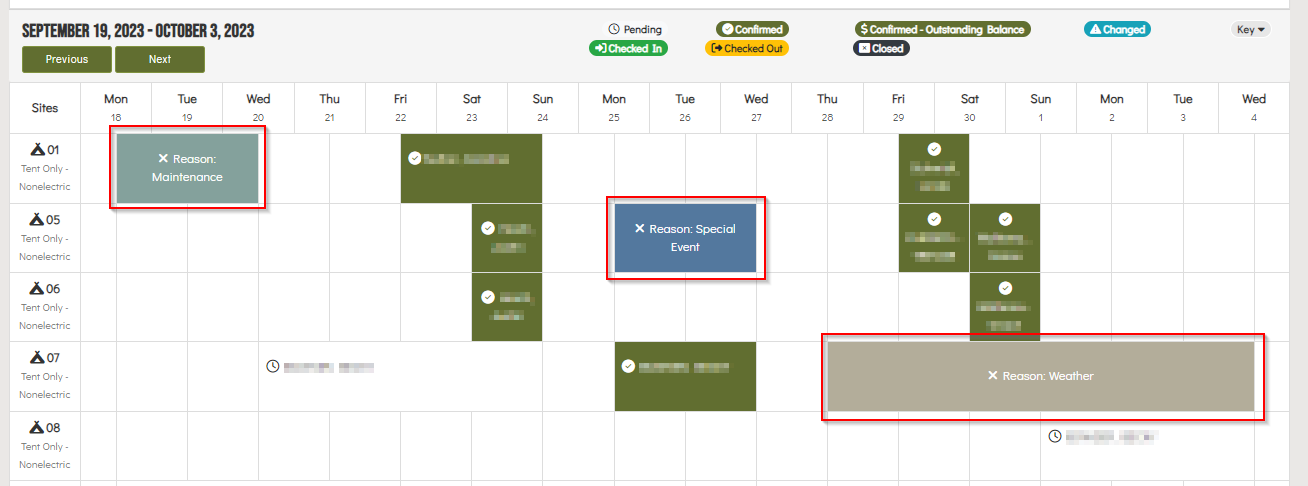
Reservation Grid Integration: Easily create unit blackouts directly from the Reservations Grid.
Day Use Grid Compatibility: The separate Day Use Grid offers a convenient way to manage day use unit blackouts directly from the grid, providing flexibility and ease of use.
Admin-Level Control: Administrative users have the power to manage blackout dates at both the unit and facility levels through the manage/edit facility pages in our service desk module, offering granular control over reservations. As well as additional permissions to apply blackouts over active reservations.
Detailed Tracking: When creating blackout dates, require blackout reasons and additional details to enhance transparency for users viewing the grid. This feature also aids in tracking and reporting.
Mass Blackouts Made Simple: Administrative Service Desk users with the appropriate permissions can now create reservation blackouts on a mass scale effortlessly. Our Create/Remove Multi-Site Blackout button on the reservations grid streamlines this process.
How-To / Workflow Articles
Upcoming Improvements
Look out for upcoming enhancements to Blackout Dates, aimed at simplifying reservation/facility management. Alongside each update, we'll provide detailed documentation to guide users through the new features and improvements.
N/A